Showing feedback, minus the chasing.
JustShown gives listing agents one link to send after every showing. The showing agent taps it, answers a few quick questions in the phone's browser, and the reply lands in your inbox under the right property. Nothing to install, no account to make, and no third follow-up text from you.
Free for 14 days, then a simple subscription.
Cancel anytime in Google Play. For Android 7.0 and up.
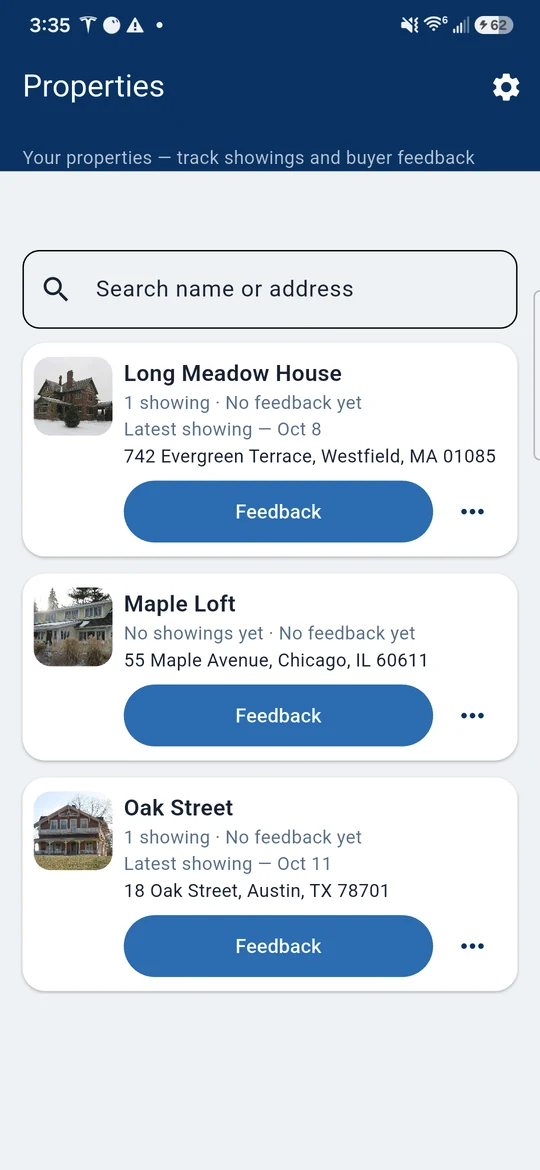
Your seller wants answers, not “I'll ask.”
A text thread gives you “nice house, thanks!” two days late, if it comes at all. JustShown gives you the same few questions answered after every showing, in writing, filed under the property. When your seller asks what buyers think, the answer is already on your phone.
Two agents. One link. No phone tag.
For you, the listing agent
- Add the property. Give it a name and address. That's its home for every showing and every reply.
- Add the showing and send the link. Put the showing on the property, then share its feedback link by text or email from your own phone, the way you already talk to other agents.
- Read the replies. Answers land in the property's feedback inbox, and Trends shows what buyers liked and didn't like across showings, at a glance.
For the showing agent
- Open the link. It works in any phone browser. Nothing to download.
- Answer a few quick questions. Interest, condition, price versus value, and what landed or didn't. Tap, type a line if you want, done.
- Send it. It goes straight to the listing agent. You get your afternoon back.
Built for the listing side of the deal.
One inbox per property
Every reply files itself under the house it's about. No digging through a week of texts to find what the agent at 2:30 said about the kitchen.
Trends that read like a quick take
Trends pulls out what buyers liked and what they didn't, so the pattern shows up before your seller asks about it.
A gentle lock-up check
Ask showing agents to confirm they secured the property before they leave. It's a friendly reminder on the form, not a gate.
Showings on your calendar
JustShown can add your showings to a calendar on your phone named JustShown, so the day's schedule sits right next to everything else.
A showing-day nudge, if you want one
Turn on the optional showing-day reminder and your phone gives you a heads-up with the link ready to share. You decide who gets it and when you hit send.
Message the showing agent
Need a follow-up? “Message showing agent” is right there on the property, using your phone's own messaging.
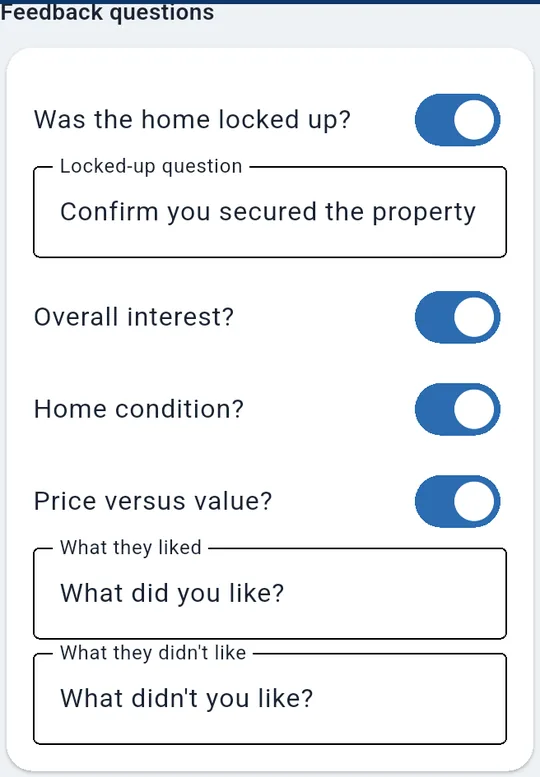
Your questions, your wording.
Turn questions on or off in Settings: overall interest, home condition, price versus value, plus “What did you like?” and “What didn't you like?” Reword any of them so they sound like you.
No app. No account. No password reset.
If a listing agent sent you a JustShown link, you're one tap from done. It opens in your phone's browser, asks a few quick questions about the home, and sends your answers straight to the listing agent. There's nothing to install and nothing to sign up for. We'd rather you spend the time on your next showing.
Put it on a real listing.
Every feature, on your real listings, free for 14 days. After that it's one simple subscription, monthly or annual, and you can cancel anytime in Google Play. Showing agents never pay, never sign up, and never install anything.
Something you wish JustShown did? Tell us at feature@